Claude Code is a very useful tool for coding, planning, research and content creation straight out of the box. However what really sets it apart from basic LLM chatbots is the tooling surrounding it. One of the most useful elements of this tooling is the ability to add skills to Claude. The question of course is when you should add tools and what tools you should add. Which skills are useful for Claude code in which situations? In the past I have written a post about some general Claude Code hints and tips. This post will look a little more closely at specific skills that improve Claude Code. Remember that you can add skills to the Claude web chatbot as well at https://claude.ai/customize/skills.
Check for Existing Skills First
There are some good guides to writing skills for Claude. You should read Anthopic’s guide and I quite like this article. However, perhaps surprisingly, writing a skill for Claude should not be your first option. Why is this?
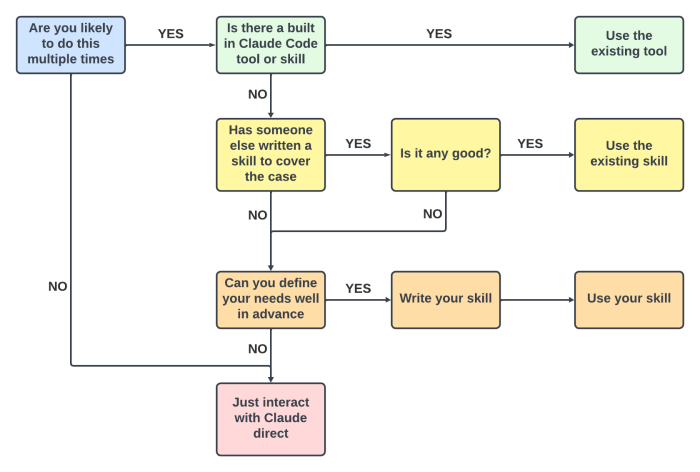
Some tasks simply do not lend themselves to tooling, perhaps there are several decisions involved which you do not want to create a decision flow for. Perhaps the task would benefit from a creative back and forth with input from yourself. Perhaps the task is something you do not feel equipped to codify, or a one off task. In that case you may be better to simply interact with Claude in the usual way.
Next Claude has built in tooling and skills which cover a lot of basic cases like working with Word, Excel and PowerPoint Documents, shell scripting, interacting with Git and more. These built in tools have been extensively tested. They are robust and competent. Think twice before trying to supplant them with a skill of your own.
Even if Anthropic have not written tooling for your use case, someone else might have. There are a lot of well written skills out there which can be found with a little research on the web. Be careful not to reinvent the wheel when creating skills. That said there are low effort, poorly designed skills in plenty on the web, so do review the skill before adding it to your tool belt. Also remember that malicious skills are a possibility, you should treat installing skills with the same caution as installing untrusted code.
Finally be wary of loading your Claude instance down with too many tools. Anthropic warn in their list of antipatterns that too many tools can lead to issues: “Tool selection accuracy degrades rapidly above 5 tools. Similar tools create ambiguity. Keep 4-5 tools per agent. Distribute the rest across specialized subagents. Focused agents with fewer tools make better selections and produce higher quality results.”
The next part of this post will try to point to some useful skills that already exist for Claude Code.
Useful Skills
With all that out of the way, here are some useful tools which are worth considering as of June 2026. Be aware that this information is likely highly perishable, this space is moving very fast at present.
Skills For Real Engineers by Matt Pocock: an excellent set of skills for software development. Has skills to support the whole development lifecycle and ensures that documentation is kept organised and up to date alongside code
Superpowers by Obra: An alternative to Matt Pococks skills. Tends to be rather more prescriptive and less flexible.
data-analytics-skills by Nimrod Fisher: A set of data analytics skills. Many of them are perhaps unduly specific, but it provides a good template for how you could approach giving Claude skills to act as a data analyst.
LLM Wiki by Andrej Karpathy: Initially just a GIST of an idea on how to get an LLM tool to store data in a structured way, it has now been implemented by a number of people in concrete form for Claude Code. Here is one example implementation. There are also numerous articles explaining the concept in more detail like this one.
Graphify by safishamsi: Gets Claude to create and use a knowledge graph for your project. Useful for larger and more complex projects. Note that it needs a python library install which is graphifyy with two Ys. Has numerous library plugins, be sure to read the docs!
SQL Expert by Hatem Mohamed: A simple but useful skill that gets Claude to write more reliable T-SQL code
Context Mode: Not a skill as such, but rather a way of reducing how much data an MCP server injects into your context window
Justin’s Skills: Some skills of my own which help with internet research, adding consistent docstrings, archiving tickets and refactoring code. Feedback on how well these work for you would be appreciated.
If you are looking for more skills, Travis Van Nimwegen has created a great curated list of Claude skills here. This also includes a list of Claude’s built in skills which can be handy.
Keeping your Skills Organised
Once you have got the skills you want you need to keep them organised in your project. For this you may want to consider adding them to your git repo as a submodule. The advantage of this is that you keep the skills you use to develop code separate from the code itself. This avoids bloating the repo and also means that you do not accidentally distribute skills you might wish to keep private. It also allows you to build your skills as their own separate repo for use in other projects or to share them with others. There are also more sophisticated approaches such as script based deployment of software packaged skills, which can be used if desired as noted here.
I also tried adding skills to my repos in a location other than .claude/skills. In theory this would be helpful to avoid issues with submodule clashes (submodule can only be used in a clean directory). I had read that the --add-dir flag exists for Claude might allow you to add extra skills directories. However it appears this is not the case. Therefore importing skills from repos can be a little convoluted and involve some manual copying or a helper script.
If you are packaging skills for others to use, you can add useful documentation and any package requirements to your submodule repo with a file structure like:
  Justins-Claude-Skills/
  ├── .justin/
  │   └── skills/
  │       ├── add-docstrings/
  │       ├── archive-tickets/
  │       ├── internet-research/
  │       └── python-refactor/
  ├── pyproject.toml       ← Python deps if any
  ├── requirements.txt     ← Python deps if any
  ├── license.txt
  └── SUBMODULE_SETUP.md
This means that the skills directory is clean and easily copied into .claude/skills to avoid submodule clashes, the disadvantage is it means that syncing is not so easy needing a copy as well as a pull. Hopefully as skills use matures a standard solution to issues like this will arise.
Another thing to note is that Claude Code’s marketplace installs plugins to user scope ~/.claude/plugins/. However you can use try this repo to allow for more flexible skill installations. Personally I prefer not to install skills to ~/.claude/plugins/ because while Claude only reads the headers, if you are working on multiple projects with different skills, you are both adding unneeded skill definitions to context windows and increasing the number of skills available. This increases the possibility that Claude accidentally misuses them or uses them unnecessarily wasting time and tokens.
