PostgreSQL is great but it does not do everything out of the box. Here are some options you can activate and extensions you can install to cover common database requirements.
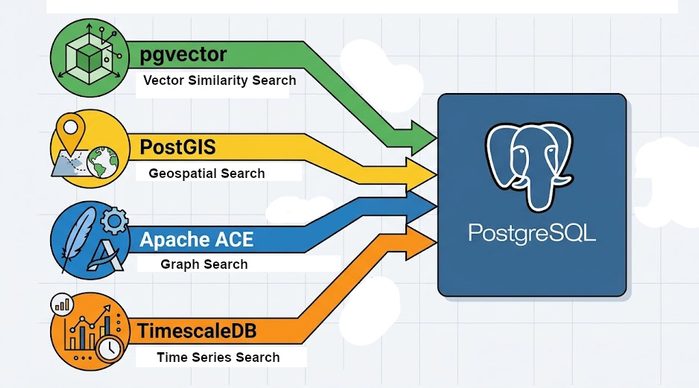
Useful Tools
Procedural Control
Lets start with a built in module. Suppose you want to handle complex business logic or perform computations on data within your database. Sometimes you can achieve what you want with SQL, but if not, remember that PostGRES comes with PL/pgSQL by default. Useful when you want to perform complex logic and calculation server side rather than passing SQL data back to the client requesting it. Here is a handy tutorial.
Fuzzy text search
The easiest way to access fuzzy matching on Postgres is to use pg_trgm. While it is a built in you need to enable pg_trgm with CREATE EXTENSION IF NOT EXISTS pg_trgm; before you can use it. pg_trgm allows for both fuzzy searching with a % operator as well as similarity calculations to allow for answer ranking. It also allows for the creation of indexing for fast similarity matching. pg_trgm is based around trigram matching.
Another option for fuzzy matching is to use Levenstein distances (broadly the number of changes need to mutate from one string to another). There is another built in module we can use for this sort of fuzzy matching fuzzystrmatch. This can be enabled with CREATE EXTENSION IF NOT EXISTS fuzzystrmatch; In fact fuzzystrmatch enables other forms of match beyond Levenstein, but these are somewhat wrapped around with caveats as noted in the documentation.
Introductions to Postgres fuzzy matching using these modules can be found here and here
Cryptography
As we should all know by now rolling your own crypto is rarely a good idea. Postgres solves this with pgcrypto a cryptographic library allowing for password hashing and salting, symmetric and asymmetric encryption and production of cryptographic randomness for other uses. Like the other core libraries this is easily enabled with CREATE EXTENSION IF NOT EXISTS pgcrypto
Specialist Database Types
Time Series Data
The most widely adopted extension for time series data is TimescaleDB. Instructions for use can be found in the TimescaleDB Github repo. Of particular use is the ability to create hypertables which are tables with very efficient time indexing and partitioning to allow for retrieval from the kinds of huge time series datasets associated with IOT or web analytics.
Vector Search
If you want vector search for things like RAG or sematic search your best bet is likely pgvector. pgvector supports a lot of common vector comparison functions including L1 distance, L2 distance, inner product, cosine distance, Hamming distance, and Jaccard distance. A useful discussion of the different comparison metrics can be found here. An important thing to bear in mind is that different vector embedding engines have different numbers of dimensions. pgvector is agnostic as to which one you use, but you do need to remain consistent, since otherwise you will end up with incompatible data. This can be important when receiving data from multiple sources since you need to ensure the same vector embedding is being used since embedding is not generally done server side. Also there are a number of different indexing strategies you can use for indexing vector columns with different pros and cons, be sure to read the notes.
If you need to handle truly huge quantities of vector searches you may want to look at pgvectorscale which is built on top of pgvector.
One thing to note is that at one point a lot of folks recommended the use of pgai alonside pgvector. However this project is no longer supported so I would be wary of using it.
Geospatial
If you need to handle geospatial data the go to is PostGIS, this is not preinstalled and installation can vary depending on operating system, instructions can be found here. While most people think of PostGIS for mapping geographic data, it is actually more general and can be used for other forms of geometric data. The documentation for PostGIS is rather dense, an introduction tutorial like this or this might help get to grips with it.
Graph Database
Postgres 19 is going to add some nice graph features to Postgres directly using SQL Property Graph Queries. Postgres 19 is due for release imminently as of September 2026. If you only need basic graph features, you may find that the built in capabilities will be sufficient. You can find a useful article here.
A more comprehensive option is to use Apache AGE whose repo can be found here. Apache Age offers several graph capabilities which the initial native Postgres graph implementation will not. These include:
- Variable length graph traversal
- Direct graph data writing (rather than SQL write, graph read as for Postgres 19)
- More efficient graph storage and retrieval
- openCypher support for compatibility with neo4J style queries
Performance Optimisations
Horizontal Scaling
What if you have truly large data to the point that you need to distribute your data over multiple database instances? In that case you may want to consider Citus. Citus is an open source extension that allows you to shard your database across separate Postgres nodes. Setup instructions for multi-node operation can be found here. Note that Citus assumes underlying Linux so if you want to use it on Windows you will need to use the WSL or Docker.
Performance Enhancement
When you want to optimise your database do not forget that pg_stat_statements is a built in module which can be used to profile your queries to identify what is run most frequently and what queries are bottlenecking your system. You can find a useful guide here. Note that pg_stat_statements is useful mostly for identifying problematic queries. To actually optimise them you will still need to use things like EXPLAIN ANALYZE and check your indexing and join strategies as normal. Here is a great tutorial on query optimisation.
Another way to improve performance is to us an extension like pg_repack to clean up tables and indexes. While you can clean up Postgres with operations like CLUSTER and VACUUM, pg_repack can achieve the same kinds of clean up without requiring locks on tables making it useful for tidying production data. The instructions are here and the project’s github repo is here.
If some of your tables have grown large and require partitioning you may want to consider pg_partman. Note taht Partman installation is a little less user friendly than some of the other extensions but full instructions are provided. Once it is installed you can follow the documentation to implement partitions as desired. Note that pg_partman does require some privileges to partition and maintain tables.
Job Scheduling
If you have tasks like database clean up or daily reports, that you would like to run on a schedule, you will likely need an extension like pg_cron. This allows you to set up up regular jobs using CRON syntax.
